Best Practices for Low Voice Latency
Voice latency represents the time between a user's spoken request and the moment the AI Agent response reaches the client side.
Latency for voice AI Agent should always be measured end-to-end from the caller's perspective, using Druid SIP details or AudioCodes call history, rather than using the Druid conversation history transcript.
When designing Druid voice AI Agents, managing this latency is critical since voice interactions require much faster response times than text-based chat. Below is the optimized guide for the DRUID online help, tailored specifically for voice AI agents.
When designing Druid voice AI Agents, managing this latency is critical since voice interactions require much faster response times than text-based chat. Below are best practices tailored specifically for voice AI Agents.
Understanding Druid Voice Processing Flows
Druid voice AI Agents typically execute one of two workflow types.
Long Workflow (Intent Identification)
The IDLE/Intent Switch workflow is executed when the AI Agent needs to determine the user intent or switch between AI Agents.
Target latency: ≤ 3 seconds
Typical execution steps:
| # | Step | Best Practice | Target latency |
|---|---|---|---|
| 1 | User utterance rephrasing | Normalize user input using LLM streaming with Druid Becus. | 300–500 ms |
| 2 | Intent classification | Classify intent using LLM with Druid Becus. | ~500 ms |
| 3 | Knowledge Base or Agent response generation | Generate the first response word using LLM streaming with Druid GPT-4o Mini. | ~500 ms (time to first word) |
Short Workflow (Inside-Agent Interaction)
This workflow executes within an active, ongoing voice session.
Target time to first word: ≤ 500 ms
Typical execution stages:
- Generate an immediate conversational response.
- Execute business functions or tools.
- Return final results.
Best practice: Deliver a response or a "reasoning/explanation" message to the user immediately while simultaneously executing tools or function calls in the background to buy processing time and avoid dead air.
Key Optimization Strategies for Voice AI Agents
Use the "Knowledgebase with GPT V4" Solution
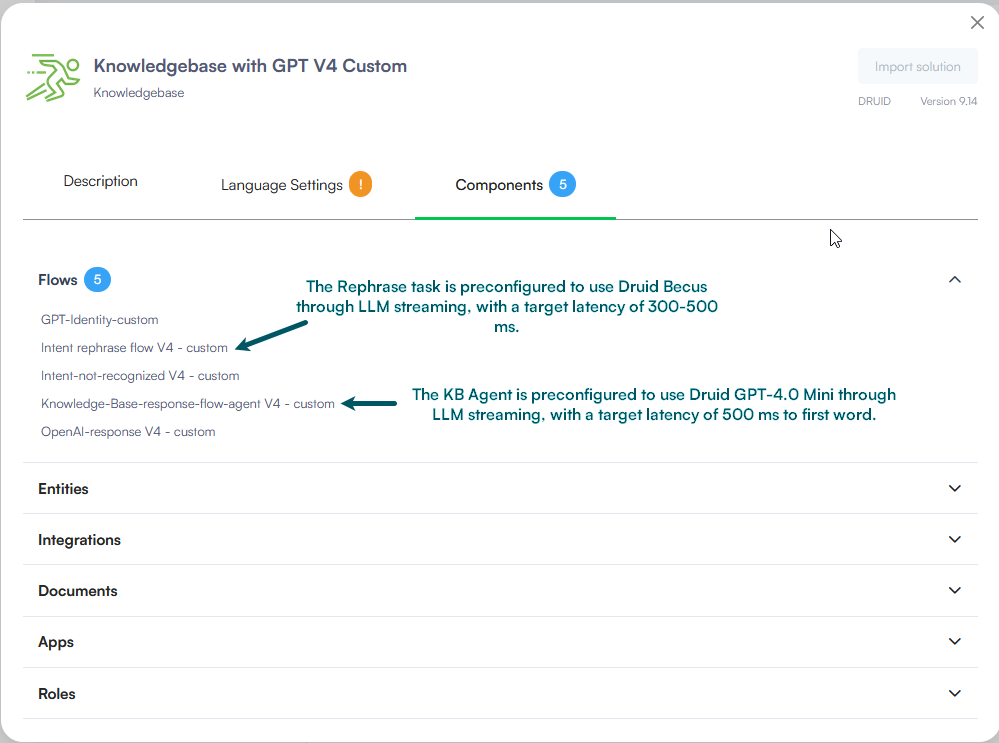
Deploy the pre-configured Knowledgebase with GPT V4 solution available in the Solution Library. It includes optimized Rephrase and KB Agent flows natively connected to Druid Becus for low latency. Import the solution and use it without changes.
Use LLM-Based Intent Recognition with Druid Becus
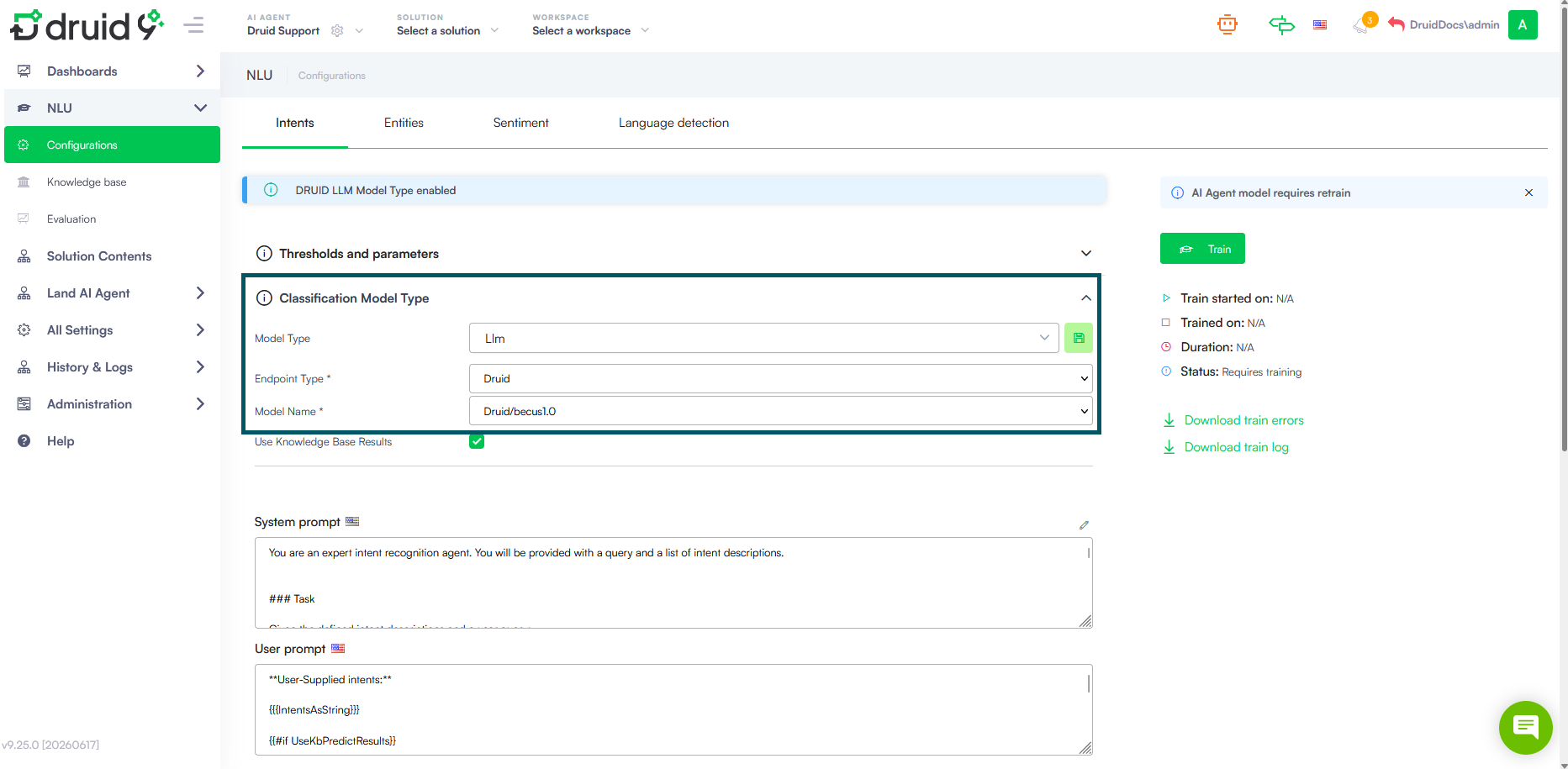
Configure intent recognition to use:
Model Type: LLM
Endpoint Type: Druid
Model: Druid Becus
This configuration is especially important for voice AI Agents where every additional processing step contributes to user-perceived latency.
Use LLM Streaming Whenever Possible
Use the LLMStreamer internal action instead of a classic LLM connector integration whenever possible. Because LLM Streamer is a Druid internal service, it avoids the additional roundtrip through the Druid Connector host and reduces dependency on external client infrastructure during response generation.
The main advantage of LLM streaming is that the AI Agent can start returning the response in smaller chunks as soon as content becomes available, instead of waiting for the full response to be generated. This significantly improves time-to-first-token and helps the voice AI Agent begin speaking faster.
LLM Streamer is especially recommended for intent rephrasing, Knowledge Base responses, agent reasoning, and tool-calling workflows. Even when used with function calls, its proximity to the Druid conversational engine helps reduce latency and improve the overall responsiveness of the voice experience.
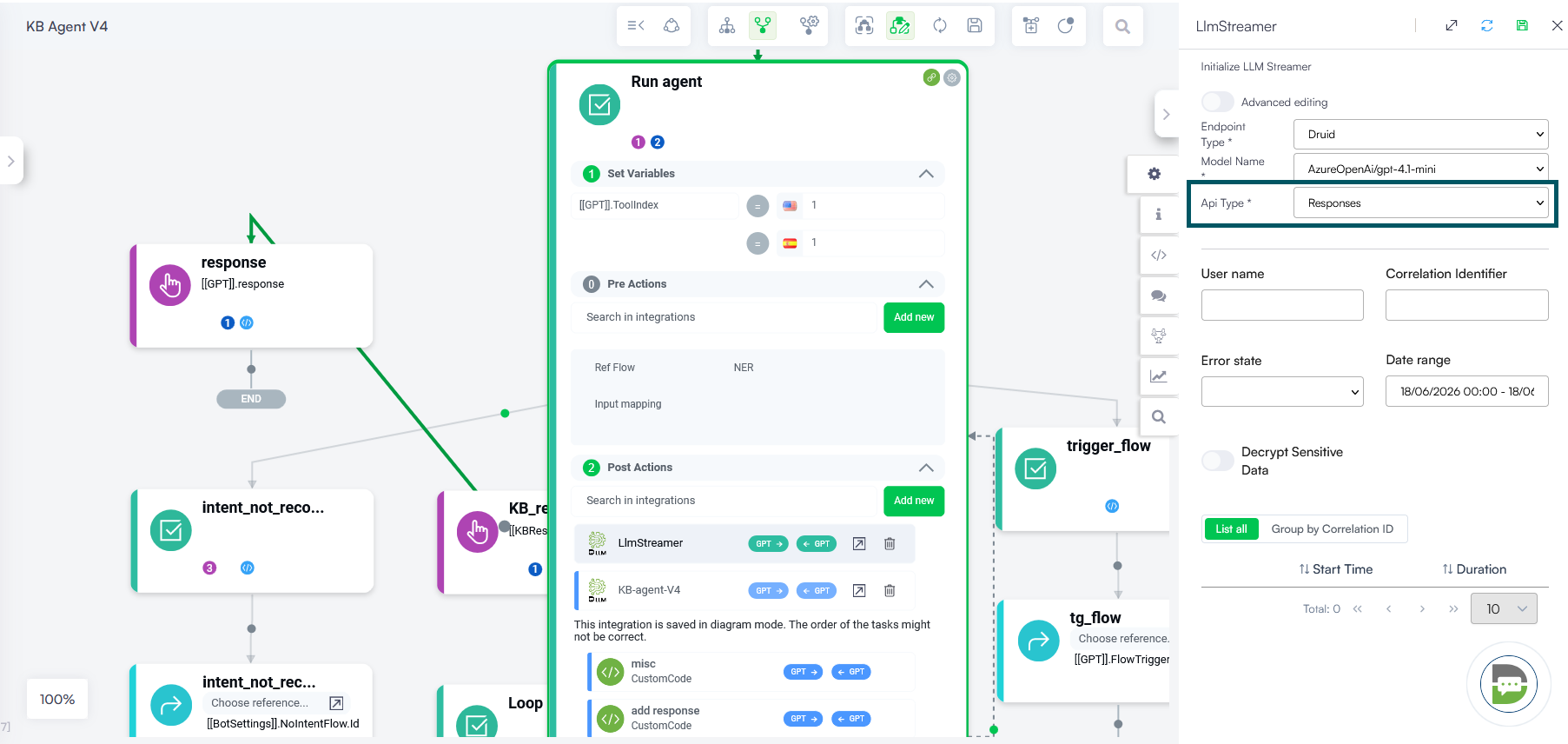
For configuration instructions, see Use LLM Response Streaming for Voice Interactions.
Minimize LLM Calls Per User Messages
LLM calls are typically the most significant contributors to response latency in a AI Agent. While Druid AI Platform components can be optimized and tuned, external resources such as LLM services and third-party APIs are outside Druid control and may introduce additional delays. For this reason, voice AI Agent flows should be designed to use LLM calls as efficiently as possible.
Keep the Number of LLM Calls to a Minimum
As a best practice, each user utterance should trigger no more than one intent rephrase call (if rephrasing is required) and one Knowledge Base Agent or Business Agent response-generation call. Avoid chaining multiple LLM calls together, as sequential processing increases both overall latency and time to first response.
Use Optimized Rephrase Flows
When implementing intent rephrasing, use the preconfigured rephrase flow included in the Knowledgebase with GPT V4 solution. This flow is optimized for low latency and is preconfigured to use LLM streaming with Druid Becus.
Keep Prompts Concise
Prompt size directly affects response time. Keep rephrase prompts focused and concise, ideally limited to a single page of instructions. Simpler prompts require less processing and generally result in faster responses.
Prefer Function Calling Over Additional LLM Requests
When using LLM Streamer, prefer function calling within a single interaction rather than triggering additional LLM requests. Combining reasoning and tool execution in the same interaction reduces processing overhead and helps the voice assistant respond more quickly.
Use LLM Streamer for Knowledge Base Response Generation
Knowledge Base response generation is one of the key contributors to overall voice latency. After relevant articles have been retrieved, the LLM must analyze the content and generate a response. The efficiency of this process directly affects how quickly the voice AI Agent can begin responding to the user.
To minimize response times, use LLM Streamer for Knowledge Base response generation whenever possible.
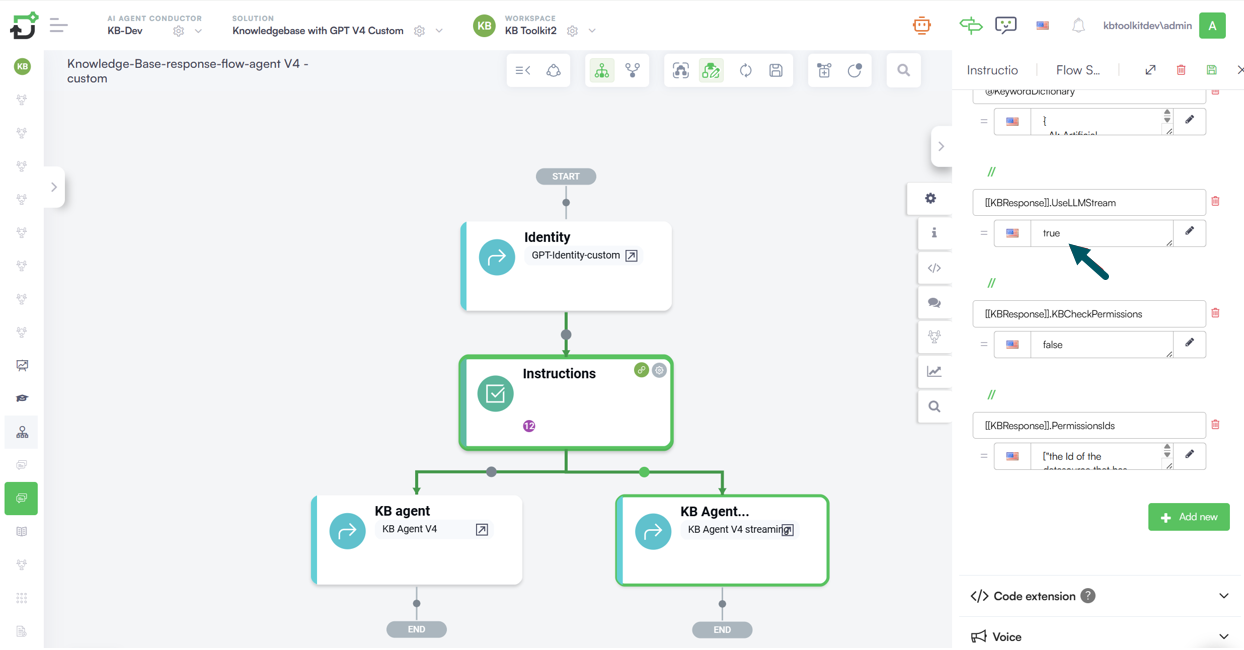
Unlike traditional LLM integrations, LLM Streamer enables responses to be delivered incrementally as they are generated, significantly reducing time-to-first-token and allowing the voice AI Agent to start speaking sooner.
Optimize Knowledge Base Retrieval Settings
The efficiency of Knowledge Base retrieval has a direct impact on both response quality and voice latency. Retrieving too many articles increases reranking time, enlarges the prompt sent to the LLM, and ultimately delays response generation. Optimizing retrieval settings helps ensure that the most relevant content is identified quickly and that the LLM receives only the information required to generate an accurate answer.
Limit the Number of Retrieved Articles
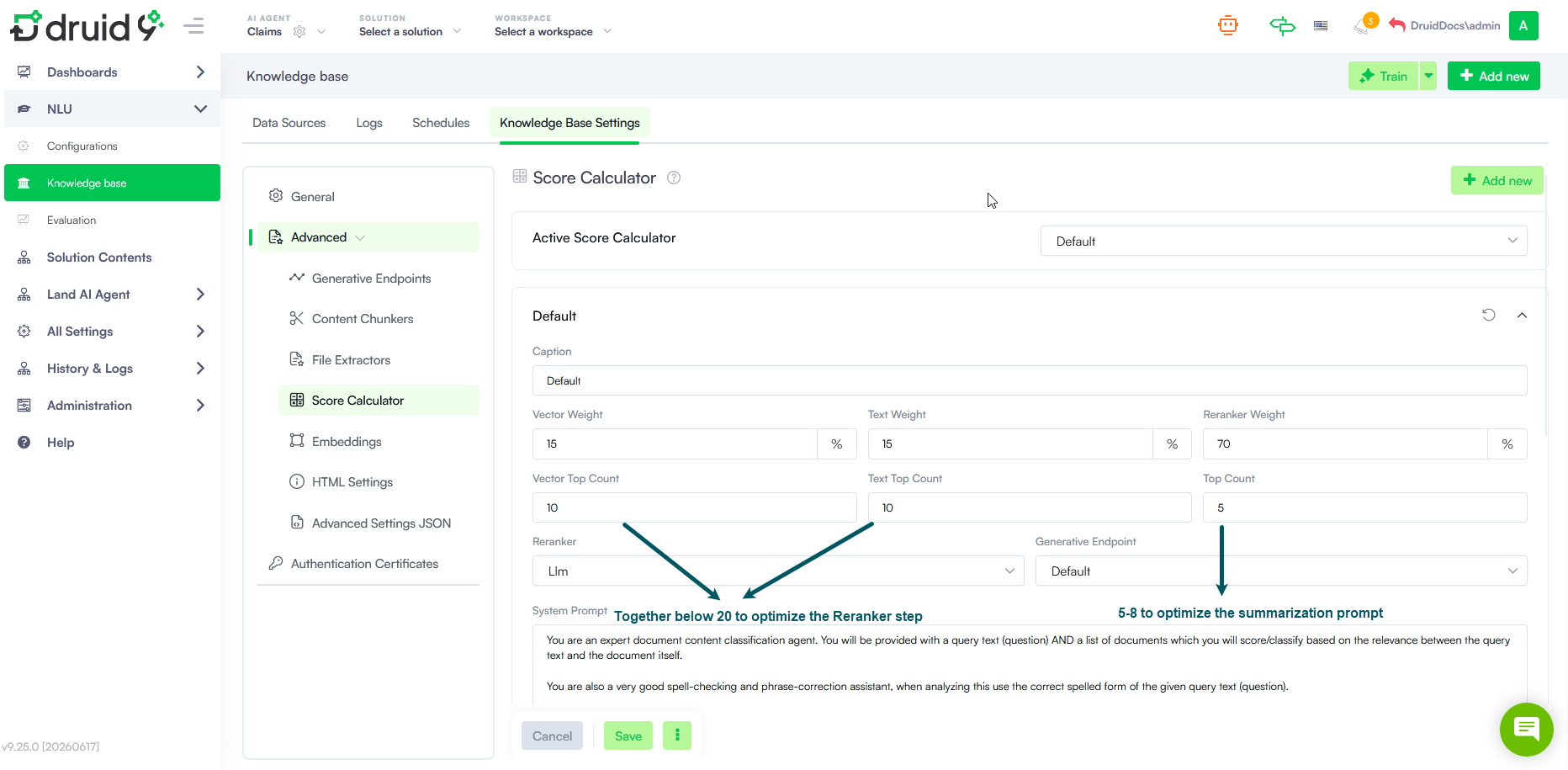
To reduce retrieval and reranking time, keep the combined value of the Vector Top Count and Text Top Count parameters below 20 whenever possible. In addition, configure the Top Count parameter to return between 5 and 8 articles. This reduces the amount of content included in the summarization prompt and helps improve response times.
Improve Content Quality and Structure
Well-structured content improves retrieval accuracy and reduces the need to process large numbers of articles. Organize Knowledge Base content using meaningful metadata, appropriate chunk sizes, and clean article formatting. The goal is to ensure that the most relevant information consistently appears within the top retrieved results.
Optimize Retrieval Features
Different embedding models can produce different retrieval results, so testing multiple embedding options may help improve relevance. For more information, see Embeddings.
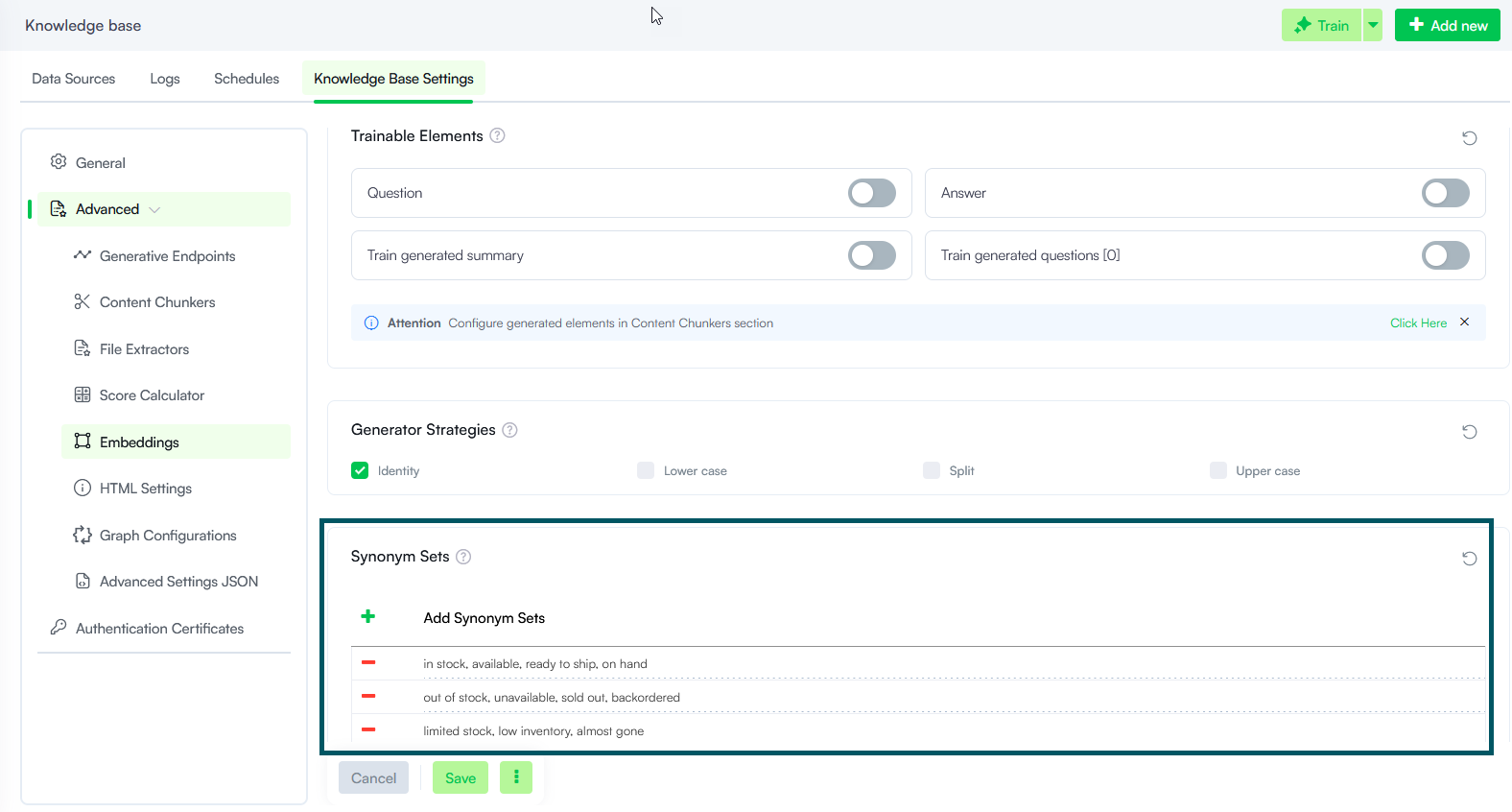
Where applicable, use the Synonyms Dictionary to enhance retrieval accuracy. For more information, see KB Dictionary.
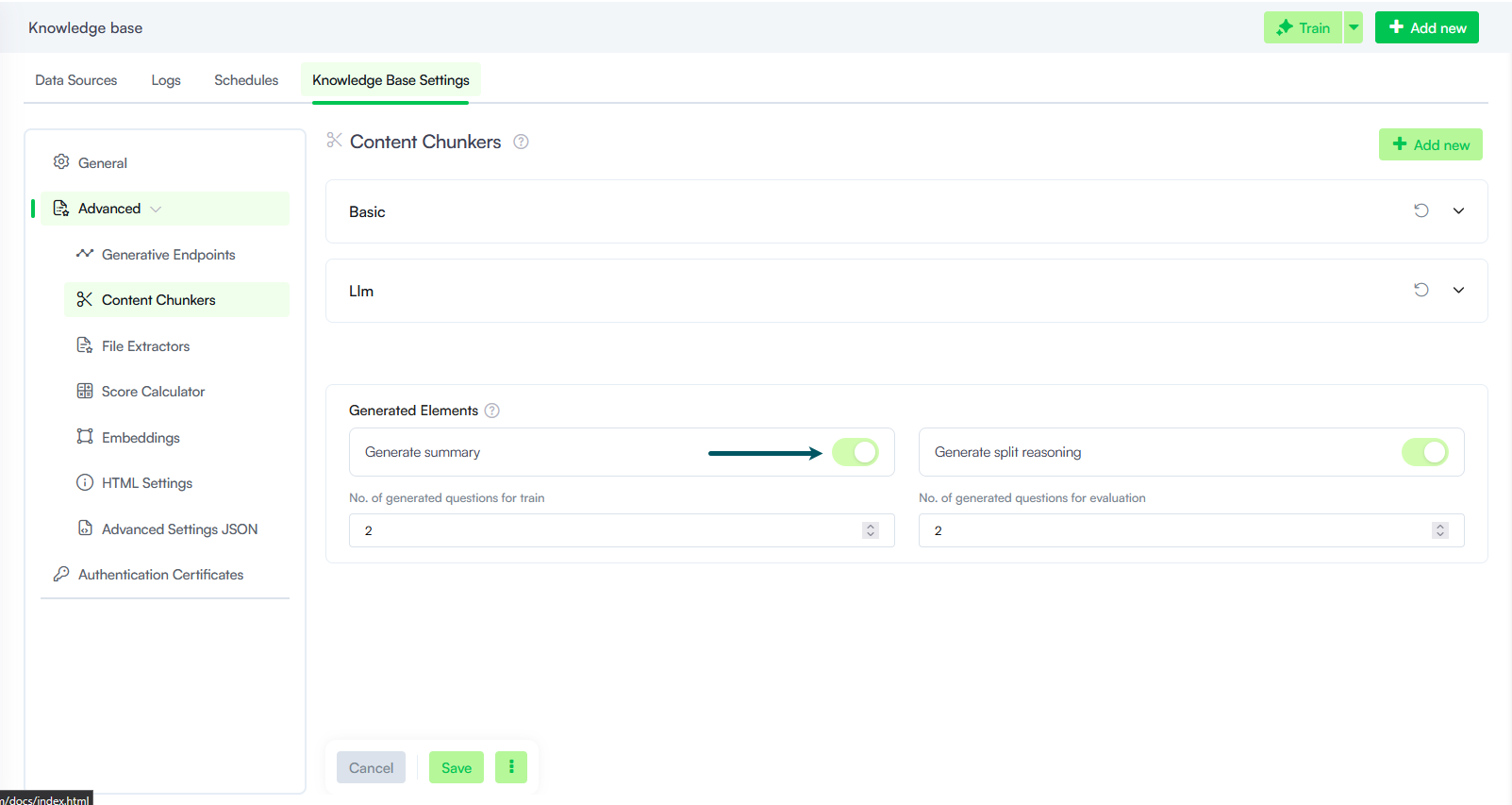
Additionally, enable Content Chunker > Generated Elements to improve content indexing and increase the likelihood that the most relevant information is retrieved among the top 5 results. For more information, see Content Chunkers.
Use Region-Aligned Speech Services
To achieve optimal speech performance, deploy your speech resources in the same region as your Druid Cloud environment.
This recommendation applies to providers such as:
- Azure Speech
- ElevenLabs
- Speechmatics
- Amazon Transcribe
- Other STT/TTS services
The following table shows the recommended Azure Speech region for each Druid Cloud environment.
| Druid Cloud environment | Azure Speech Region |
|---|---|
| Community | Azure West Europe |
| Production EU | Azure West Europe |
| Production US | Azure East US |
| Production HS | Azure East US |
General Conversational Design
Reducing voice latency is not only a matter of optimizing technical components such as LLMs, Knowledge Bases, and integrations. The overall conversational design also plays a critical role in how quickly and naturally the voice AI Agent responds. Even when backend operations require additional processing time, a well-designed conversation can maintain a responsive and engaging user experience.
Provide Immediate Feedback During Long-Running Operations
Some integrations, tool calls, and business processes may take longer to complete than others. In these situations, use proactive messages to acknowledge the user request and indicate that processing is underway. Responses such as "Let me check that for you" or "I'm retrieving that information now" reassure users that the AI Agent is working and help reduce the perception of waiting time.
Use Audio Cover Messages When Appropriate
For voice channels, consider using cover messages, playback sounds, or other audio cues through AudioCodes and Druid SIP integrations. These audio elements can provide immediate feedback while backend processing continues, creating a smoother conversational experience when delays are unavoidable.
Example: AudioCodes VoiceAI Connect provides configurable bot delay handling capabilities, including prompts, audio playback, and filler music. For more information, see the AudioCodes documentation.
Monitor and Optimize LLM Performance
Response times can vary across LLM providers and models. If latency becomes an issue, evaluate alternative providers or models that offer faster response times for your workload. For example, lightweight models such as Gemini 2.5 Flash or Azure OpenAI GPT-4.1 Mini may provide significantly lower latency than larger reasoning-focused models.
Select the Right Model for the Task
Not every interaction requires a large, highly capable model. Use lightweight models for tasks such as summarization, intent recognition, or content generation, and reserve more powerful models for complex reasoning scenarios. Choosing the appropriate model for each task helps reduce processing time and improves overall responsiveness.
Avoid Sequential LLM Processing
Sequential LLM calls can quickly increase end-to-end latency. As a best practice, each user request should involve no more than one intent rephrase call and one Knowledge Base or Business Agent response-generation call. Keeping the workflow simple minimizes processing overhead and helps ensure a fast and natural voice experience.
Reduce Connector Roundtrips
Connector calls introduce additional network latency that is outside the direct control of the Druid AI Platform. Each connector roundtrip can add up to 200 ms to the overall response time, depending on network conditions and connector performance. When multiple integration calls are executed for a single user request, these delays accumulate and can have a noticeable impact on voice latency.
Whenever possible, design integrations to retrieve all required information through a single connector request rather than multiple sequential calls. Reducing the number of connector roundtrips minimizes network overhead and helps the AI Agent respond more quickly.